


GeForce RTX 3090 - 24GB
I started out with a decent video card. This thing was great, good for 2 screens in full HD, but when exporting video's... not so great. A lot of crashes and it certainly could not handle 4K video! So as soon as there was more money coming in, I upgraded to this bad boy! And man, it can handle 4K exporting and running 2 screens at 4K, no problem at all!

Logitech Pro x Headset
Not only for editing I need a good headset, also when I talk to my clients I need to work hands free. I used to have a Jabra headset, but the quality was not thát great and it teared after 2 years of intensive usage. So I bought these Logitech Pro X! Its wired, because I don't like to mess around with bluetooth because my family living in my house, all using bluetooth speakers and everything!
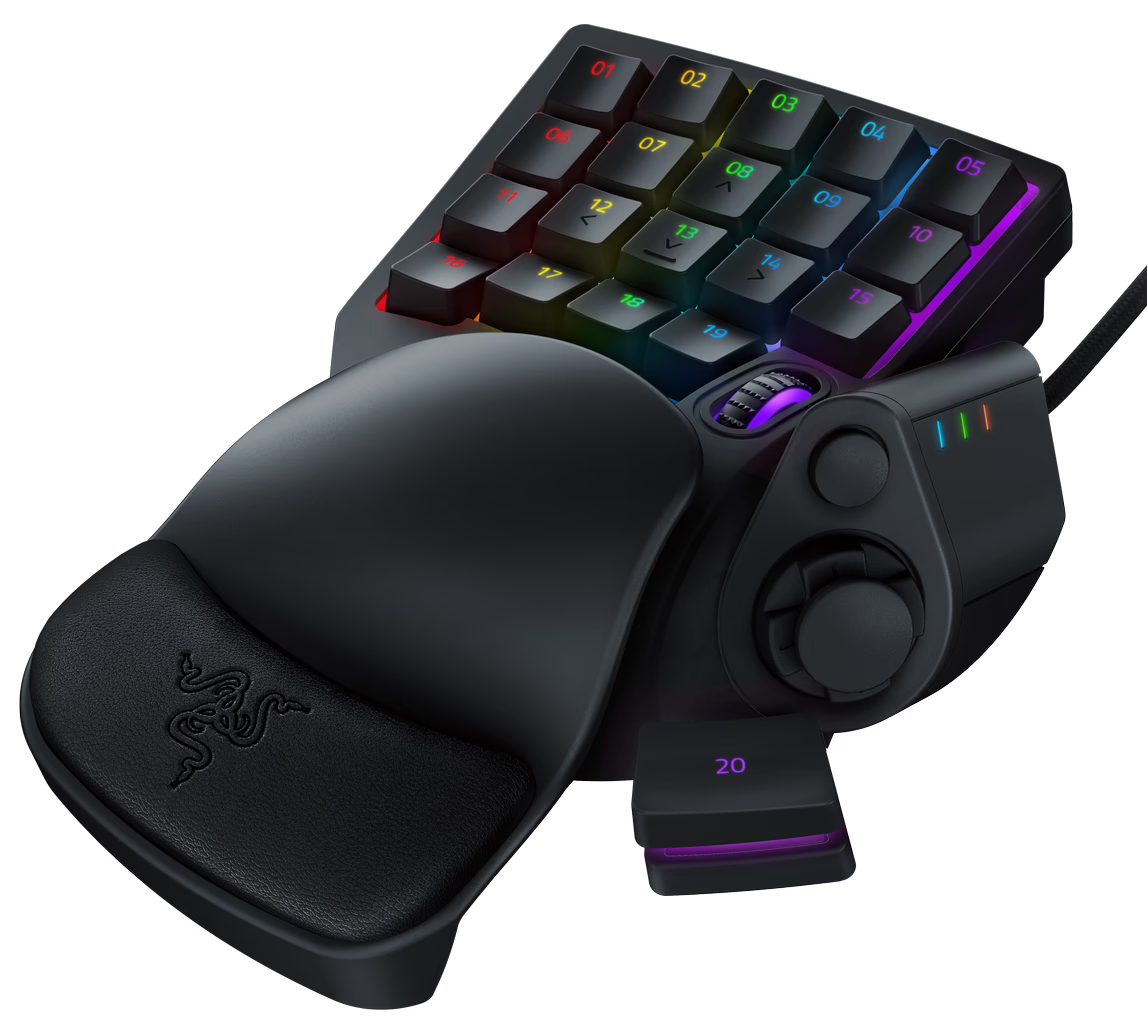
Razer Tartarus V2
When editing video's (or playing games) you might notice that your arms are just a bit to far from each other. A normal keyboard with keypad is just to wide for operating a mouse next to it. Its a unnatural way and this causes unnecessary stress on your arms. This Razer Tartarus V2 Keypad is a real game changer! With 32 programmable keys I can operate Premiere Pro faster than ever so I can speed up my editing proces while also keeping both arms in a really relaxed way! Keep in mind that cheaper keypads don't have customizable keys.

Corsair Vengeance DDR5 64GB
When working on 4K video, your RAM must not become a problem. That's why I installed 2x 32GB Corsair Vengeance DDR5 RAM. This way I have a total of 64 GB which makes video editing runs extremely smooth. Maybe I can also edit 8K with this, time will tell!

B550 Aorus Elite v2
The motherboard needed to run with an AMD CPU, it should support DDR4 64 GB and must had enough 3.2 USB ports so I could plug anything on there. Hence, the Aorus Elite v2 does a excellent job with all those things!

Corsair iCUE Link LX120-R RGB fans
When I started to use my multi-cam setup in my new studio, I was wondering why my GPU was using so much of its fans at such high speeds. Then I realised that after upgrading everything I was still using one (!) fan inside of my case! There was no airflow and that was the cause of all my crashes when exporting 4K 60fps video's. So I bought 6x the LX120-r iCUE LINK Corsair fans to cool my system down. And guess what? No more crashes since that day! And a big plus: the LEDS are really awesome!

AMD Ryzen 9 5900X 12-core 24-Thread
When editing in 4K, streaming, recording and doing everything at the same time, you need a real power beast to control everything. This CPU is incredible fast and can practicly do anything you throw at it... I'm really happy with it and it is truly a joy to have this on my motherboard!

Logitech G203 LIGHTSYNC Wired
When it comes to a mouse, I really need a mouse that is wired. I never liked the wireless mouses with batteries that run low. Also I wanted to have different profiles to use in for example Premiere Pro or Chrome. I can adjust my DPI with the button on top, so that it always work the way I want. The buttons on the side for my thumb are programmed to switch a window from one monitor to the other, and to go a page back in the browser. Extremely useful! Also this mouse is very cheap and works for minimal 2 years intensive usage.

Microsoft Ergonomic Keyboard for Business
Typing is very important when building websites and editing video. The problem I have with 'normal' keyboards are that they are... normal! Who's hands are created straight, I have never understood this. That's why I switched at a very early age to ergonomic keyboards. They really work great. This version from Microsoft is also very quiet and fits perfect on the desk.

Be quiet! Dark Rock Pro 4
Cooling this big CPU is only possible with something that can create some great cooling without giving you the feeling your PC is lifting off. And who says it has to be expensive? This Dark Rock Pro 4 cooler is really worth every penny. It stays quiet (my GPU is making way more noise) and my CPU is never overheated.

Corsair RM850x Fully Modular Low-Noise Power Supply
Giving power to this entire system is surprisingly easy with this modulair 850W power supply. It has never failed me and works perfectly, when its very cold or very hot. And the noise? I don't even hear the fan inside of it, its really perfect. But if I do, I can change the fan speed at the back of it with a knob. Nice touch!

Sony A6700
The Sony Alpha cameras are great because they can film in low-lighting setups. The A6700 was a big step upwards for me because it has 60fps and LOG recording. The reason I needed to upgrade was my new studio. The Nanoleaf lights created banding problems and the A6700 can be tuned in such a way that you don't see the banding!

Sony A6100
I started out with my Logitech C920. The first thing I invested YouTube money in was a new camera! I didn't know what to buy but I wanted a 4K camera. The Sony Alpha A6100 is affordable and does the job quit good. The only downside is that it has no LOG recording.

Sony Carl ZEISS T E 24mm F1.8 ZA E-Mount Prime Lens
I started out with the standard lens that you get when you buy the camera. Its fine, but after 3 years I wanted to upgrade my video also. With this lens the difference is huge! The 24 mm 1.8 really looks amazing. I’m very happy with it and use it for all my video’s now on my main a6700 camera!

Falcon Eyes SO-68TDX II
For a key light I wanted a really big one. But as my space is limited, I could not place a big dome. So I wanted something flat, but adjustable in kelvin and also adjustable in strenght. The Falcon Eyes SO-68TDX does a really good job at this with its 60cm diameter and is also... flat!

Shure MV7X XLR
My first microphone was my iPhone... I'm not kidding! It lay very close to my Logitech C920 Full HD webcam and with those two things I recorded the first year of all my video's. Then I bought a cheap second hand Rode NTG2 microphone which helped me out for another couple of years! The problem was however that it is very sensitive. So when I moved to Portugal for 8 months I had a big problem, the reverb inside of ALL rooms was insane and I needed a new microphone. I always had my eye on the Shure mics, but I simply found them way overprised. Untill I saw the MV7X XLR version! I bought it and I am really, really happy with it. The quality is very good, just make sure to get a pre-amp OR get the same Audio Interface as I have!

Elgato Cam Link 4K
When using a 4k camera, you bump into another problem. How am I going to get my 4K recordings to my PC without the hassle of switching SD cards every single time? And what about live streaming? Elgato has the answer! With a sweet 8K cable this little External Camera Capture Card does everything you need. Stream your camera straight into OBS and record or start live streaming.

Elgato 4K Capture Card
I want my camera's to be live connected to my PC using OBS. So when using a second camera, especially one that shoots 4K in 60fps, you need to feed this straight to HDMI to a capture card that can handle 60fps. Not many of them do! This capture card from Elgato can handle it and works amazing. Just make sure where you place it, I had to use a lifter because of the hot air from my CPU was blowing on it, causing it to crash!

Adobe Creative Cloud
I was fortunate enough to have a dad which worked as a teacher for a couple of years. That made it possible to use the Adobe Creative Cloud for a extremely low price (teacher discount). This enabled me to use Premiere Pro, Photoshop and Indesign before I could afford it. Now I use a 'man in the middle' who legally resells licenses of companies that go out of business. Saves me 90% of the costs!

Background lights
When I started I used a greenscreen. To light me out and the green screen, I bought really cheap, second handed softboxes with some 6000K lights in it. In my search to make a cool background I bought a few Philips Hue lights that I can control and save scenes via my smartphone. Its not all the way how I want it, but its a great start in my opinion!

Nanoleaf lighting
In my new studio I wanted to created a lighting setup that was a jaw-dropper. So I bougt 39 Nanoleaf Triangles and 3 Nanoleaf Light strips. These work really well if your Wifi transmitter is close by! So make sure to add a hotspot to your PC and it can function as a wireless connection point for your Nanoleaf lights. I can create any scene I want now!

Roland Bridge Cast One
There are all kind of Audio Interfaces to plug your XLR microphone into your computer. After using a low budget Audio interface first, (while still needint a pre-amp) this amazing piece of hardware came out on the market. Its so good that I made a dedicated tutorial about it.

Elgato Stream Deck+
To control my multi-cam setup, lighting and teleprompter during recording (or live streams) I bought an Elgato Stream Deck +. This one has the dials on them which are very useful to use in combination with the teleprompter. I switch windows across 3 screens with the dials, control scenes in OBS and also use it to launch apps without touching my mouse and keyboard! I love it.

Elgato Prompter
I want to make better video's. And because English is not my native language - I want to script all my video's (well, parts of it). There is only one real good choice for Teleprompting and that is the one from Elgato. Its everything I need and it works also perfect for online video calls. When the text is shown to read out loud, in the background I show the feed from OBS with a special overlay that shows if I am recording, the framerate and how my mic level is. Saved me a bunch of record time when I forgot to push on the 'rec' button!